Sold out today. Sold to the people who asked, the minute it’s back.
Reshelf puts a Notify-me form on sold-out products and, once stock is confirmed, emails the shoppers waiting under your sending rules. Shoppers who asked for a text get one after their confirmation text, between 8 a.m. and 9 p.m. in their time zone. Every alert is logged with when it went out and whether it arrived, so you never have to take our word for it.
- Mon 09:123 shoppers ask to be toldAlpine Snowboard, 158 cm
- Thu 14:03:12Shopify reports a restockInventory 0 to 8, confirmed across all locations
- Thu 14:03:532 emails and 1 text sent41 seconds after the restock
- Thu 14:043 of 3 deliveredReported back by the email and SMS providers
- Thu 15:51Order #1187, $885.95Counted as revenue from alerts
One restock, as the app logs it. Example data.
- Every alert is logged with the delivery status the provider reported back, failures included.
- Availability is re-checked across all your locations before anything is sent.
- Every alert feature is on every plan, including Free. A dedicated texting number needs a paid plan billed monthly.
- Added in the theme editor. No code to paste, and Shopify removes the block from your theme if you uninstall.
Every alert, on the record
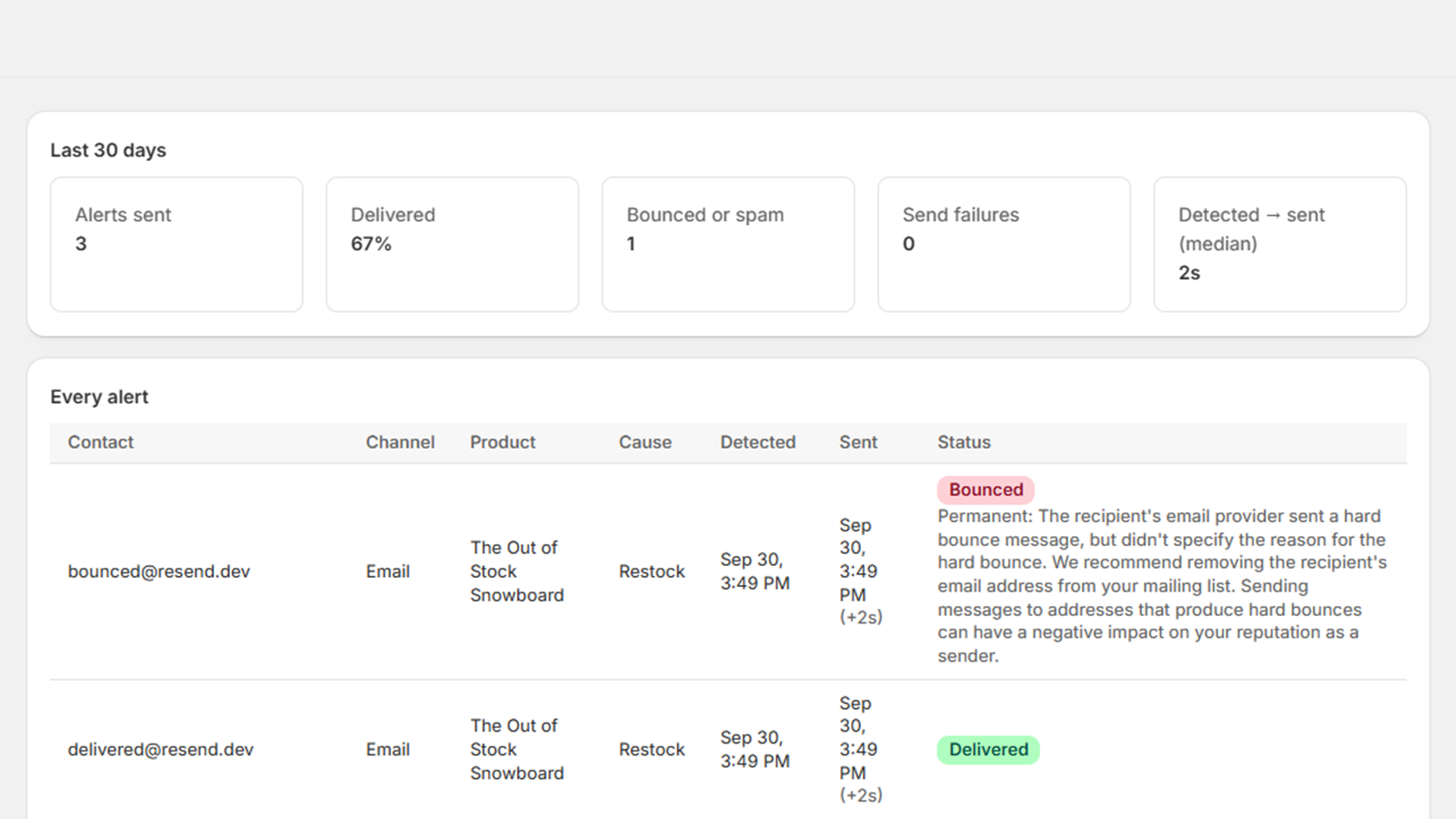
The alert log inside the app. One row per email or text: who, what, why it was sent, how long after the restock, and what the email or SMS provider reported back. When something fails, the reason is in the row.
- Alerts sent
- 212
- Delivered
- 98%
- Bounced or spam
- 3
- Send failures
- 1
- Restock to alert, median
- 38 s
| Shopper | Product | Cause | Restock detected | Alert sent | Status |
|---|---|---|---|---|---|
| k.okafor@example.com | Alpine Snowboard, 158 cm | Restock | Thu 14:03:12 | Thu 14:03:53 (+41 s) | Delivered |
| +1 602 555 0187 (text) | Alpine Snowboard, 158 cm | Restock | Thu 14:03:12 | Thu 14:03:53 (+41 s) | Delivered |
| m.lind@example.com | Alpine Snowboard, 158 cm | Restock | Thu 14:03:12 | Thu 14:03:54 (+42 s) | Delivered |
| j.perez@example.com | Alpine Snowboard, 158 cm | Restock | Thu 14:03:12 | Thu 14:03:54 (+42 s) | DelayedRecipient server busy, retrying |
| s.tan@example.com | Trail Jacket, M | Send now | Wed 11:20:05 | Wed 11:20:07 (+2 s) | BouncedMailbox does not exist |
| r.baptiste@example.com | Trail Jacket, M | Follow-up batch | Tue 08:51:40 | Tue 09:06:41 (+15 min) | Marked as spamUnsubscribed automatically |
| p.vance@example.com | Wool Beanie | Re-check | Mon 16:02:00 | Mon 16:02:03 (+3 s) | Send failedEmail service returned 422; request back to waiting |
Shopper emails and phone numbers are stored encrypted and deleted on a schedule. GDPR data requests from Shopify are handled automatically. Every email has a cancel link and a one-click unsubscribe header for mail apps, and every text honours STOP.
What happens when stock comes back
Five steps, each one recorded in the alert log.
Your sending rules
Wait until a minimum quantity is in stock before anyone is told. Or send in groups: a set number of shoppers per unit available, with the next group after a delay you choose. Oldest requests go first.
Shopify reports the inventory change
Usually within seconds. As a backstop, every waiting item is also re-checked every five minutes.
Availability is confirmed
Across all your locations, respecting “continue selling when out of stock”. Nobody is emailed about an item that is still sold out.
Emails and texts go out under your rules
Threshold or per-unit batching, in your wording, from your store’s name. A text waits until the shopper’s confirmation text has gone out, and for 8 a.m. to 9 p.m. in their time zone.
Delivery is tracked per message
Delivered, delayed, bounced or marked as spam, straight from the email and SMS providers. A spam complaint or a STOP reply unsubscribes that shopper automatically.
Sales are attributed
An order for that variant, placed with the shopper’s email address within 14 days of their alert email, counts as revenue from alerts. Text alerts aren’t attributed.
What your shopper sees
The block on a Dawn product page in both of its states, and every message the app sends, rendered from the app’s own templates with a sample product.
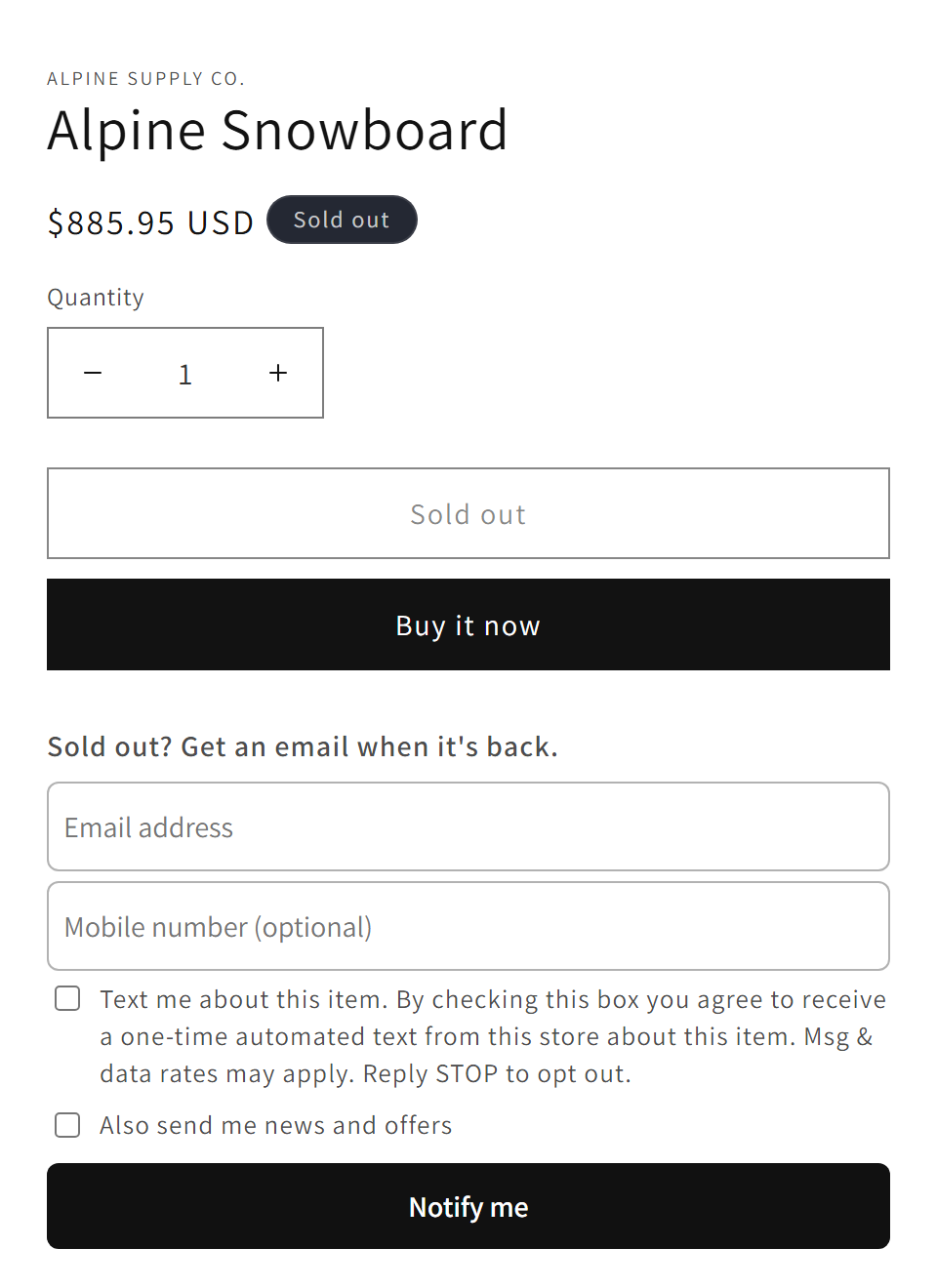
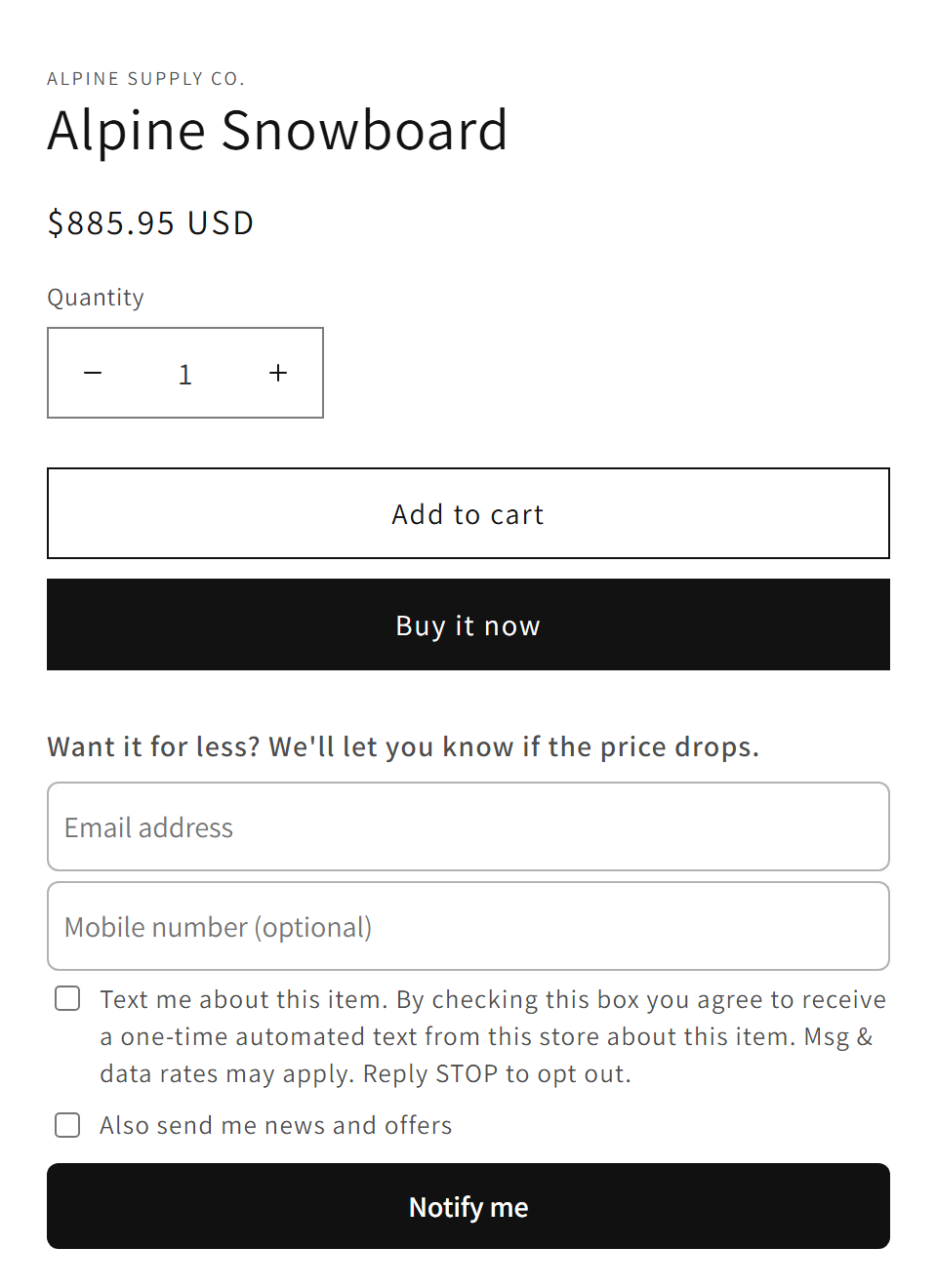
A form that only appears when it should
- Shows for the selected variant while it is sold out, and hides itself the moment it is available, unless price-drop alerts are on.
- Heading, button text and colours are yours to set in the theme editor. No code.
- Seven languages built in, matched to the storefront language.
- Optional mobile number field with the consent wording carriers require, for text alerts.
- The “news and offers” checkbox is optional and off by default.
Price-drop alerts on items that are in stock
- Off by default. Turn it on in the theme editor and the block appears on in-stock variants too.
- The alert goes out only when the price is below what the shopper saw when they asked.
- Heading is yours to change; the form fields and consent are shared with the restock form.
- If the item sells out first, the shopper is offered a back-in-stock alert instead.
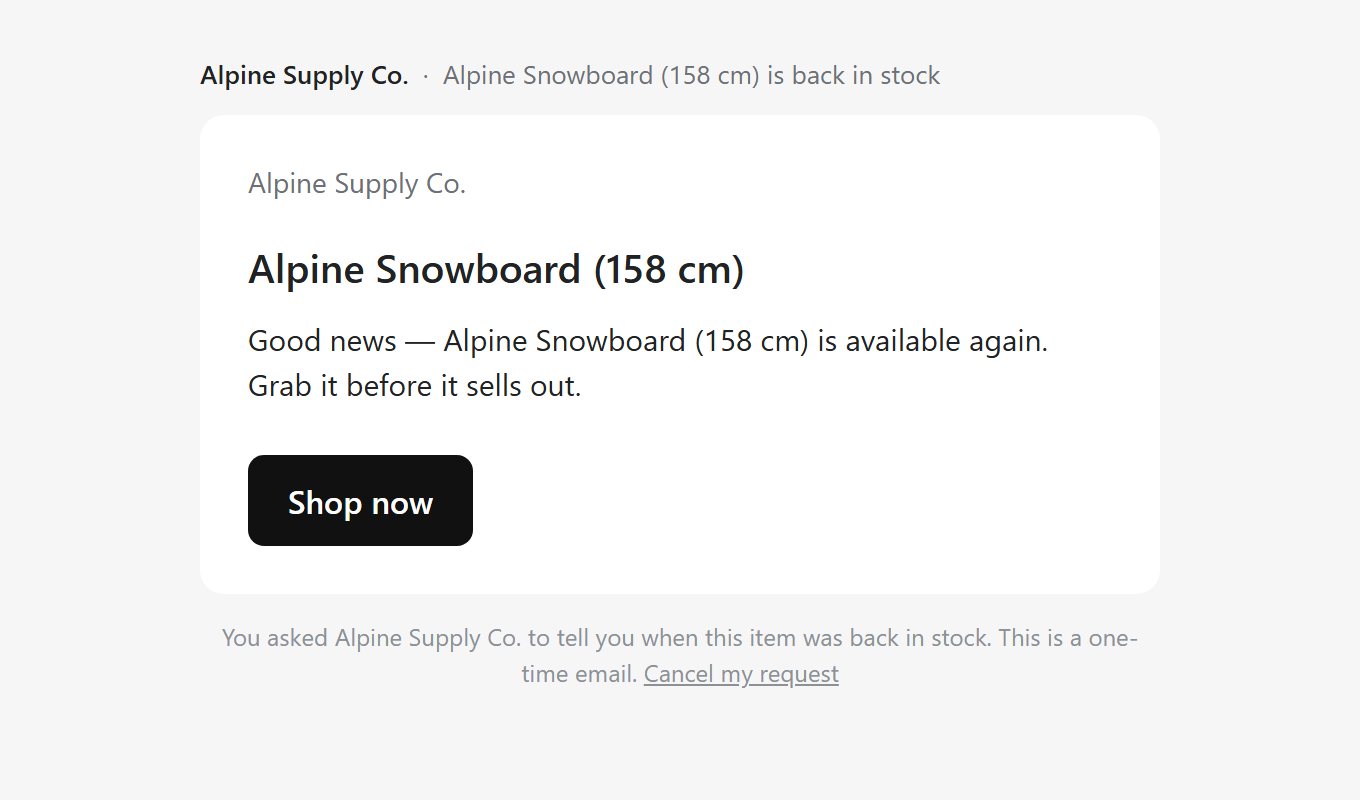
The email that goes out after the restock
The restock logged at the top of this page, as it reaches the shopper: your store’s name on it, the variant they asked about, and a link straight to that variant.
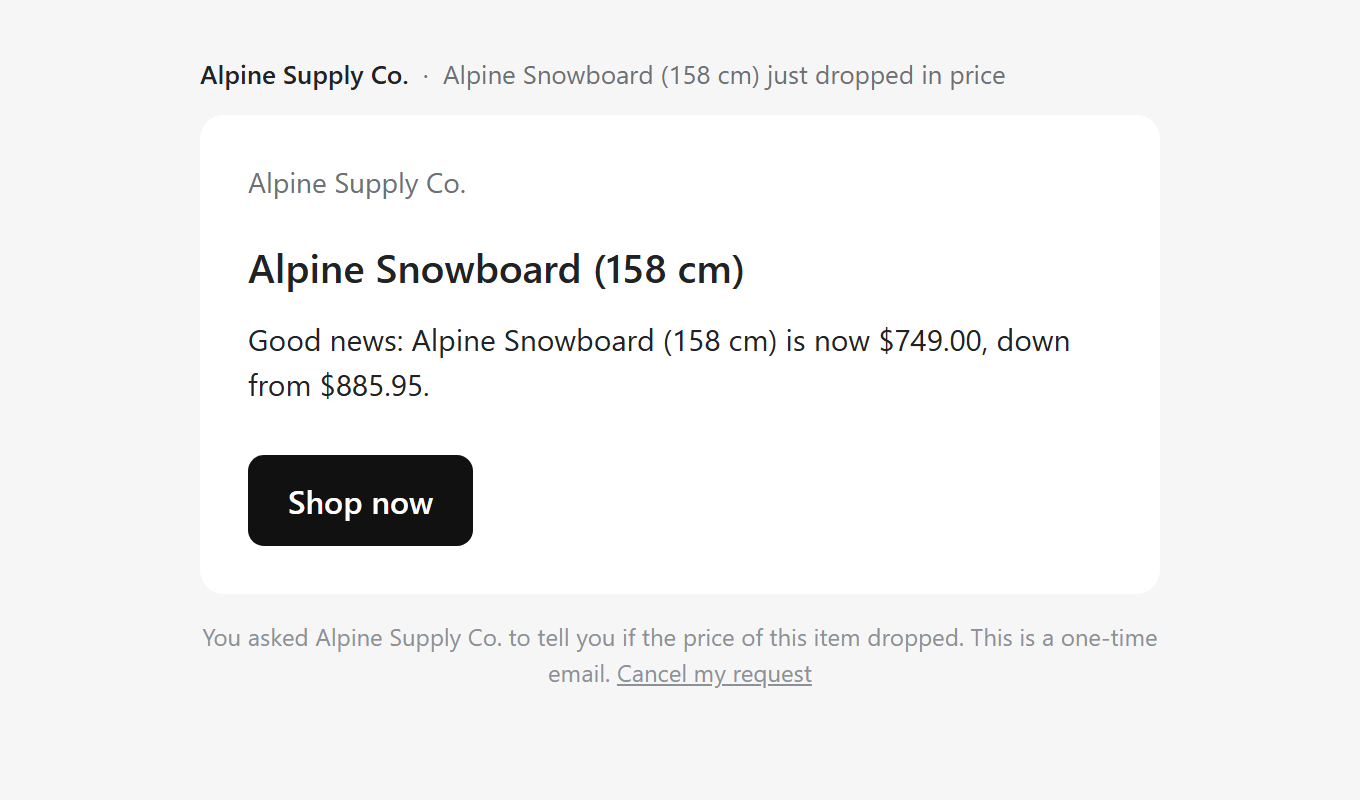
An email that reads as yours
- Your store’s name as the sender; replies go to your store email.
- The product image and a link to that exact variant, not the collection page.
- Subject line and wording edited in Settings, with a live preview, for restocks and price drops separately.
- A cancel link that opens a page to confirm, plus a one-click List-Unsubscribe header so mail apps show their own button.
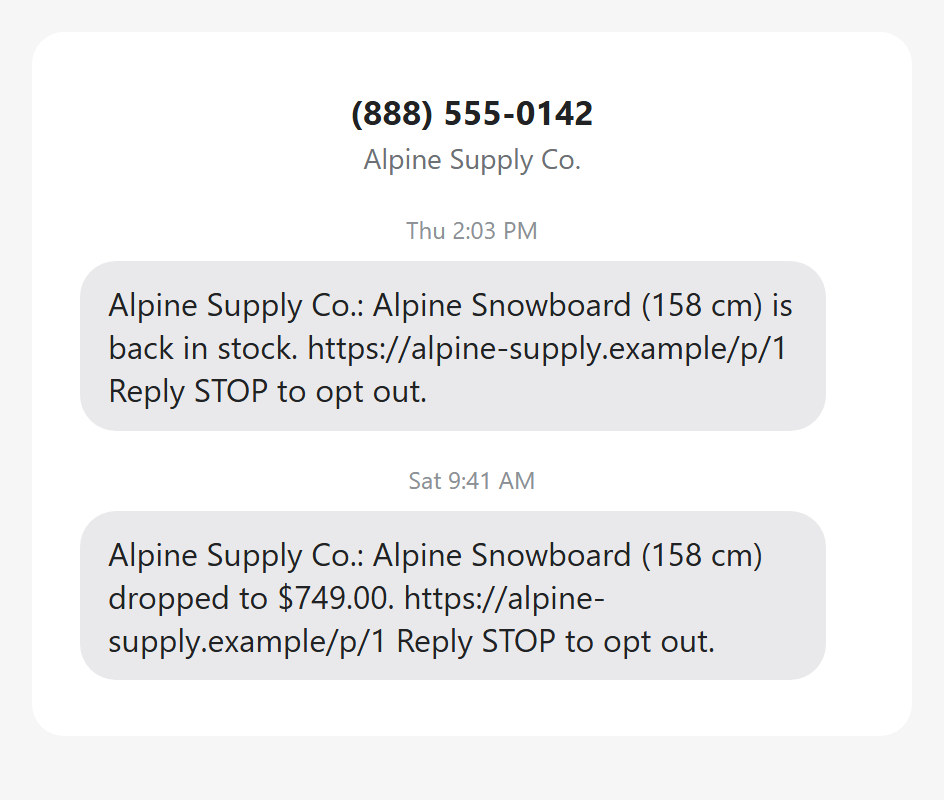
The text your shoppers get
- Short, from your store’s name, with a link straight to the variant.
- The STOP line is added automatically if your wording leaves it out; a STOP reply unsubscribes at once.
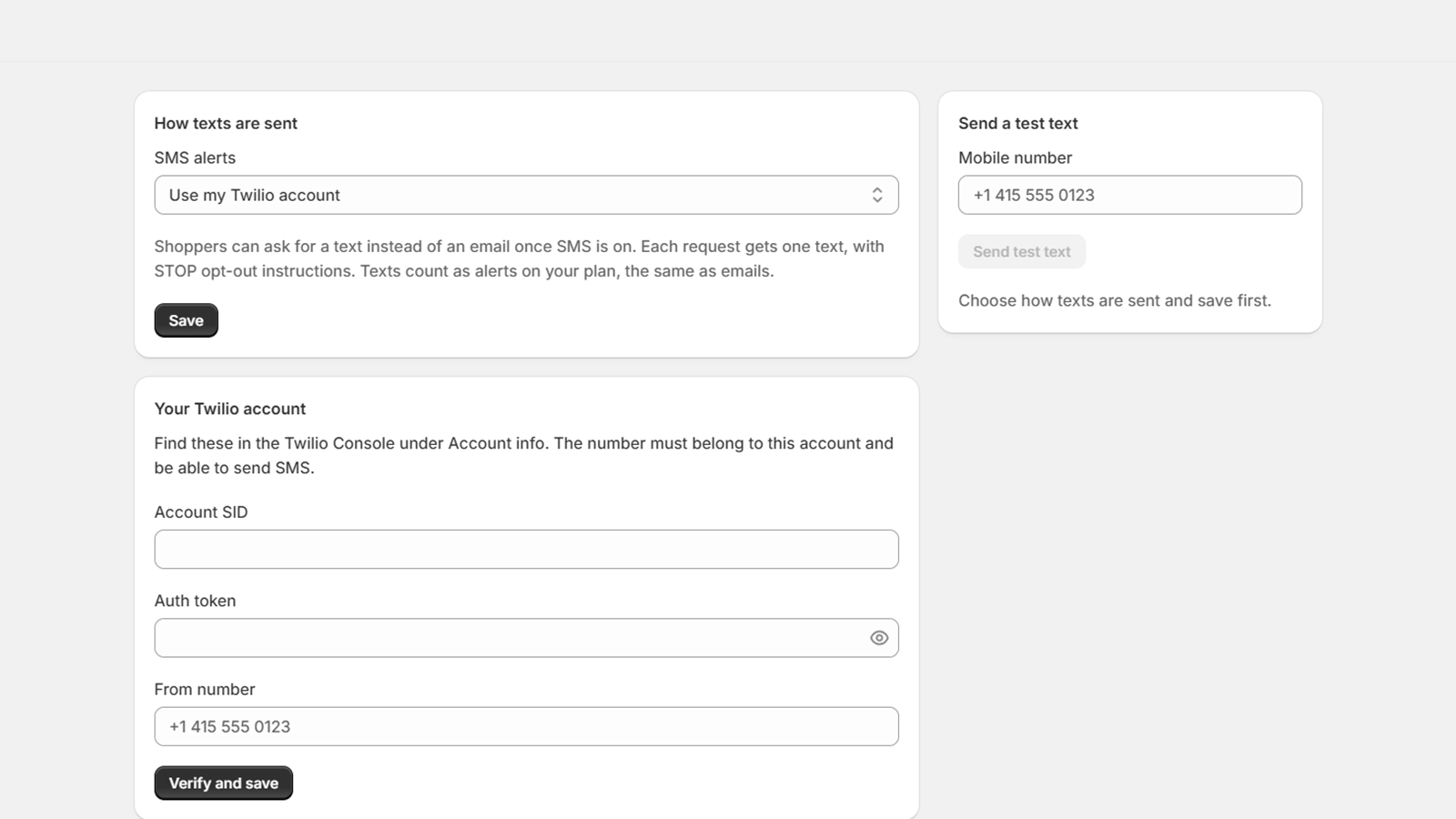
- Sent from a number that is your store’s alone: one in your own Twilio account, or a dedicated toll-free number Reshelf registers in your business’s name. You choose on the app’s SMS page.
- Sent only after the shopper’s confirmation text, and between 8 a.m. and 9 p.m. in their time zone.
- Each text shows in the alert log with the status the carrier reports back.
Every back-in-stock app has the form. The difference is what happens after.
If one has gone quiet on you before, these are the parts built differently here. All of it is on every plan, including Free.
- Alerts that went out late, or never
- Shopify tells us the moment inventory changes, and every waiting item is re-checked every five minutes as a backstop. The log shows the gap between restock and email, to the second.
- Alerts marked “sent” that nobody received
- Each email and each text carries its own delivery status from the provider: delivered, delayed, bounced, marked as spam, or the exact send error. If sending stops, the home screen says “Alerts are paused”.
- Alerts for items that were still sold out
- Before any email goes out, real availability is re-checked across all your locations. No confirmed stock, no email.
- Three hundred emails for a restock of five
- Set a minimum quantity before anything sends, or email a few shoppers per unit in stock and the next group after a delay. You choose the rule.
- The feature you need, one plan up
- Every alert feature is on every plan, including Free; plans differ in how many alerts they send a month. The one thing that needs a paid plan billed monthly is a dedicated texting number, whose charges Shopify bills as usage.
Email, text, and price drops. Same form, same log.
- Text alerts
- Shoppers can leave a mobile number next to their email, with a consent checkbox that carries the wording carriers require. Texts go out from your own Twilio number, or from a dedicated toll-free number Reshelf sets up and registers in your business’s name; you choose on the app’s SMS page. Each request gets a confirmation text first, and alerts go out between 8 a.m. and 9 p.m. in the shopper’s time zone. STOP replies unsubscribe automatically, and every text shows in the log with its delivery status.
- Price-drop alerts
- On items that are in stock, the same block can offer “tell me if the price drops”. When the price goes below what the shopper saw, they get an email or text with the old and new price.
- Klaviyo sync
- Connect your Klaviyo key and, for shoppers who tick the newsletter box, each request and each alert email lands on their Klaviyo profile as an event. They also join the list you choose. Email addresses only: mobile numbers are never sent.
- Shopify Flow
- Two triggers for back-in-stock requests by email, “request created” and “alert sent”, for tagging customers, Slack posts or your own reports. Text and price-drop requests don’t fire them.
Install freeAll of it on Free, up to 50 alerts a month, with texts through your own Twilio account. Move up when you send more, or for a dedicated texting number.
Nothing fails quietly
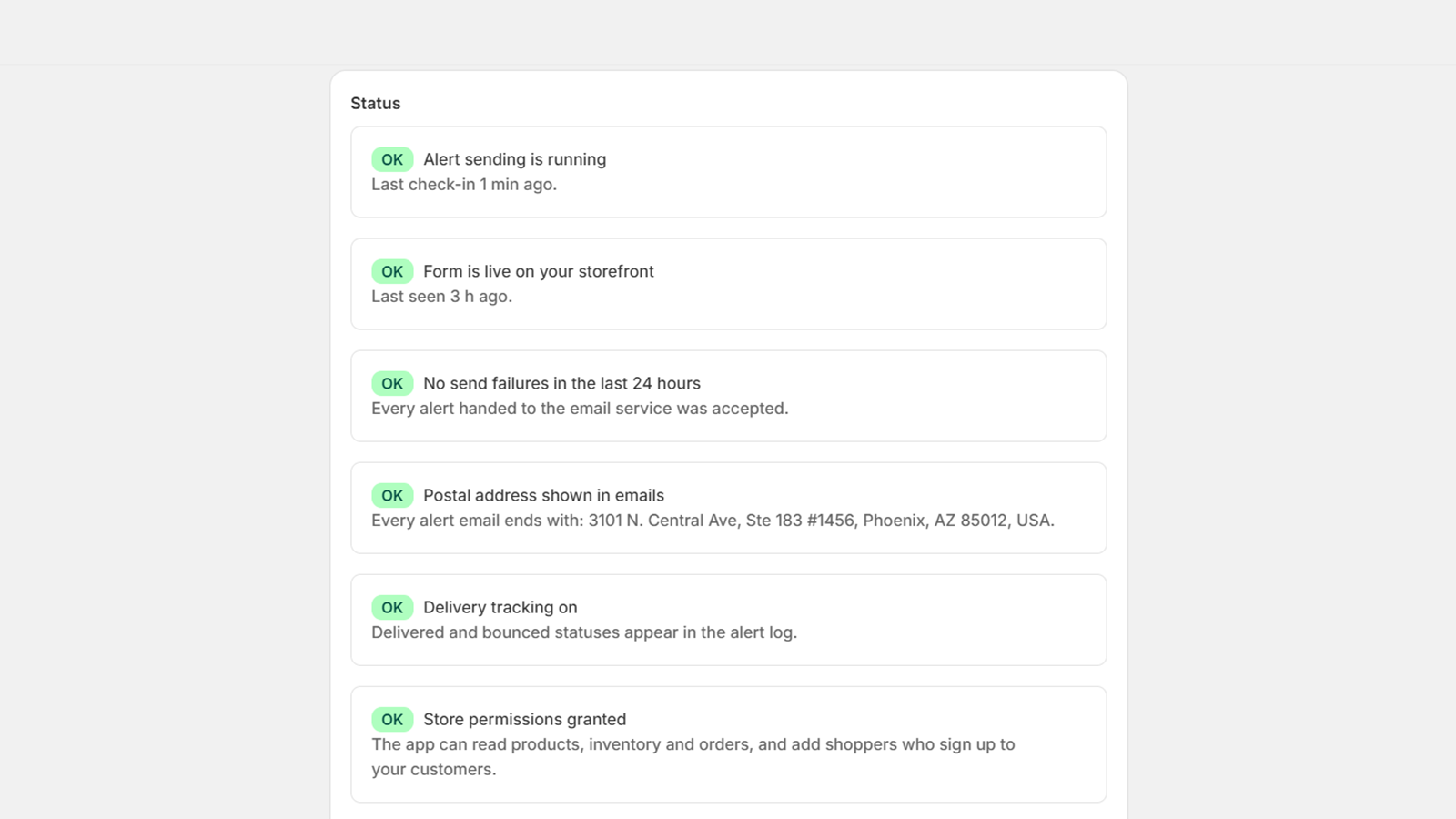
The home screen checks itself every time you open it and says plainly when something needs you. Next to it, what the alerts earned.
- OKAlert sending is runningLast check-in 40 seconds ago.
- CheckForm last seen 3 days agoIt may have been removed from the theme, or the store has had no product-page traffic.
- OKNo send failures in the last 24 hoursEvery alert handed to the email and SMS services was accepted.
- OKDelivery tracking onDelivered and bounced statuses appear in the alert log.
- OKStore permissions grantedThe app can read products, inventory and orders.
- OKLast inventory update received 2 minutes agoRestocks reach us instantly through Shopify; a full re-check of waiting items also runs every 5 minutes.
- Revenue after alerts
- $4,310
- Orders after alerts
- 19
- Alerts sent
- 212
- Conversion rate
- 9%
An order counts when it includes the alerted item and carries the same email address, within 14 days of the alert email. Text alerts aren’t counted.
| Alpine Snowboard, 158 cm | 27 waiting | |
| Trail Jacket, M | 14 waiting | |
| Wool Beanie | 9 waiting |
The full list, oldest request first, exports as CSV. Useful before you reorder.
Two Shopify Flow triggers ship with the app, “Back-in-stock request created” and “Back-in-stock alert sent”, so you can build your own automations on top. Both fire for email requests.
What you see in Shopify
The app lives inside your Shopify admin and uses Shopify’s own interface, so there is nothing new to learn.
Pay for alerts sent, not for features
Every alert feature is on every plan; plans differ in how many alerts go out a month. A dedicated texting number needs a paid plan billed monthly. Billed by Shopify on your regular invoice; cancel any time from the app.
Free
$0 forever
Every alert feature included
50 alerts a month
No card needed.
Starter
$9 a month
Every alert feature included
1,000 alerts a month
14-day free trial.
Growth
$19 a month
Every alert feature included
5,000 alerts a month
14-day free trial.
Unlimited
$29 a month
Every alert feature included
No cap on alerts
14-day free trial.
- Signups are never capped. Shoppers can always ask to be told. Only alerts sent count, email or text alike.
- Texts from your own Twilio number: Twilio bills you directly at its rates and Reshelf adds no charge, on any plan including Free.
- Texts from a dedicated number Reshelf sets up and registers with the carriers in your business’s name: $2.15 per number for each monthly billing period once it’s approved (none while a free trial runs), plus 2¢ per text segment to US and Canadian numbers after your store’s 5 free texts, confirmation and test texts included, up to a monthly spend cap you set. Shopify bills both, on a paid plan billed monthly. On Free, an approved number is released after 14 days’ notice. Emails are never charged per message.
- Paid plans are never blocked at the cap. We keep sending and ask you to move up.
- On Free, requests over the cap wait where you can see them, and go out the moment you upgrade, or on the 1st.
Questions merchants ask
Does it work with my theme?
Any Online Store 2.0 theme (Dawn and everything built since 2021). You add the block in the theme editor; there is no code to paste, and Shopify removes the block from your theme if you uninstall. Shoppers Reshelf added to your Shopify customers stay there.
Where do the emails come from?
From our sending domain, with your store’s name as the sender and replies going to your store email. They do not count against your Shopify Email or Klaviyo limits.
Does it send SMS?
Yes. Turn on the mobile number field in the theme editor and shoppers can ask for a text, with a consent checkbox. On the app’s SMS page, choose your own Twilio number, which Twilio bills you for directly with no charge from Reshelf, or a dedicated toll-free number Reshelf sets up and registers in your business’s name, at $2.15 per monthly billing period once approved plus 2¢ per segment after 5 free texts, on a paid plan billed monthly. Shoppers get a confirmation text first, and alerts go out between 8 a.m. and 9 p.m. in their time zone. Push notifications are not a feature.
Can shoppers ask for a price-drop alert?
Yes. Switch it on in the theme editor and the block offers it on in-stock items. The alert goes out when the price is below what the shopper saw, by email or text, with both prices in the message.
Does it work with Klaviyo?
Paste a private API key on the Integrations page and turn on the newsletter checkbox in the block. For shoppers who tick it, requests and alert emails become events on their Klaviyo profile and they join the list you pick. Klaviyo gets email addresses only, never mobile numbers, and shoppers who don’t tick the box are never sent to Klaviyo.
Variants, multiple locations, pre-orders?
Alerts are per variant, availability is checked across all locations, and “continue selling when out of stock” is treated as in stock. Pre-orders are not a feature.
What about shopper privacy?
Emails and phone numbers are stored encrypted and deleted on a schedule. Shoppers are also added to your Shopify customers (you can turn this off), and a newsletter tick becomes email marketing consent in Shopify and, if you connect Klaviyo, a subscription to your list there. Every email has a cancel link and a one-click unsubscribe header for mail apps, and every text honours STOP. Shopify’s GDPR data requests are handled automatically. Details are in the privacy policy.
What happens if I go over my plan?
On a paid plan, nothing stops: alerts keep going out and the app asks you to move up. On Free, requests over the cap wait in a visible queue and are sent when you upgrade or on the 1st of the month.
Install Reshelf
Reshelf is a Shopify app: it installs and runs inside your Shopify admin. Already have it? Open it from your store.
In your Shopify admin, go to Apps and choose Reshelf.